Tomorrow night, one of my blog visitors has been ask to me
how to insert search engine at the header blog? Hmmmm... All right... I try to answer this question. To inserting a search engine or everything at the header column, you must split your header column became 2 or 3 column. For example I'm has been split my header column became 2 column.
Much technique to split header column, however I will show you my technique at my free template magazine template 1, so before you exercise to split header column please download template here! And then please create a new blog for practice.
Are you ready to do some action with me? All right.. follow these steps. Go to your page element, and you will find template structure like this :
Now we will change the header column become 2 header columns. Click Edit HTML tab, go to your template code and find the code like this :
/* Header
===================================
*/
#header-wrapper {
width:900px;
margin:0 auto 0px;
background:$bgheadercolor url(http://ahom24.googlepages.com/magazine_01.jpg) no-repeat top center;
height:190px;
}

#header-inner {
width:900px;
background-position: center;
margin-$startSide: auto;
margin-$endSide: auto;
}

#header {
margin: 0px;
text-align: left;
color:$pagetitlecolor;
}
Delete above code and replace with this code ; /* Header
===================================
*/
#header-wrapper {
width:900px;
margin:0 auto 0px;
background:$bgheadercolor url(http://ahom24.googlepages.com/magazine_01.jpg) no-repeat top center;
height:190px;
}
#head-inner {
width:600px;
background-position: left;
margin-left: auto;
margin-right: auto;
float:left;
}
#header {
margin: 0px;
text-align: left;
color:#ffcc66;
}
#r_head{
width:300px;
float:left;
padding-top:10px;
}
Go to lower side and find the code like this : <div id='header-wrapper'>
<b:section class='header' id='header' maxwidgets='1' showaddelement='no'>
<b:widget id='Header1' locked='true' title='Test Blog (Header)' type='Header'/>
</b:section>
</div> Delete above code and replace with this code : <div id='header-wrapper'>
<div id='head-inner'>
<b:section class='header' id='header' maxwidgets='1' showaddelement='no'>
<b:widget id='Header1' locked='true' title='Test Blog (Header)' type='Header'/>
</b:section>
</div>
<div id='r_head'>
<b:section class='header' id='header2' preferred='yes'/>
</div>
</div>
Click SAVE CHANGES button and done.
Now click Page Elements tab and you will see your header column become 2 columns :

OK guys, now you can add anything at the new element in the right header.
If you feel interest with this post, please digg it.
See you next time at my new tutorial.

 Want to get 1 top ranking at Google Search? Need ton traffic to your site? Optimize your site or blog. Don't know what should be do with your blog? Download this SEO e-book and read how to optimize your blog. The creator of this free e-book is Brad Callen. I'm loving this e-book because very simple but complete, good tips and trick. So, don't waiting untill tomorow, go a head to download this e-book. File size to download is only 1.66 MB. Please click at the image button :

 Do you a web designer, blog designer, or hobby to edit your blog template? Maybe you need this tool. The name of this tool is HTML Color v1.4, with HTML Color V1.4 you can get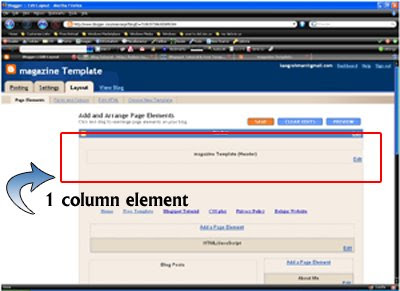
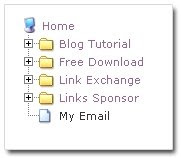 Did you ever seen Window Explorer? At Window Explorer have a beauty menu likely my left banner. Did you know, you can make that menu at your blog. For example, please checkout my example blog
